Winterbreak
January 2025
Shall we play a game?
My venture into Kindle hacking began when I had a thought: Wouldn’t it be neat to play chess on a Kindle?
At the time, I was on firmware 5.16.1 which had no available jailbreak. As always, when something doesn’t exist - that’s the perfect time to make it!
Mesquito
Enter: The Kindle Store
The obvious entrpoint was the Kindle’s userstore (accessible when you plug it into a computer).
Stuff that exploited the actual book renderers seemed too complex to figure out at the time and I doubted there were any major exploits there.
There was an interesting folder in the userstore that had been mostly unexplored by the community, however: .active_content_sandbox.
I had already used this for KWebBrew to add the browser bookmarks, but I had never explored it properly.
That’s when something caught my eye:
.active_content_sandbox/store/resource/cachedResources/index.html
This was interesting, because opening the file showed lots of references to the Kindle store albeit obfuscated.
Just for kicks, I tried replacing this file with my own custom file and opened the store.
To my surprise, the Kindle actually loaded it… For a split second before it gave an error saying the store was unable to load.
Some further investigation and reverse engineering the cached HTML files showed that the following needed to be set for the Kindle to believe the store had loaded:
storeContext.isPartialPreload = true;
storeContext.isStoreLoaded = true;
window.storeContext.isPartialPreload = true;
window.storeContext.isStoreLoaded = true;
kindle.appmgr.onback = function(a) {return true;}
kindle.appmgr.onforward = function(a, b) {return true;}
And so, Mesquito (Named after Mesquite - the Kindle’s web app runner) was created! Whilst this may seem like just another fancy entrypoint to load my own HTML similar to KWebBrew, since we are replacing the Kindle Store’s HTML, it’s actually got some interesting capabilities…
Airplane Mode & Other Shennanigans
Getting the store to load this cache reliably was somewhat difficult at first, 90% of the time it would simply show the “Updating your Kindle Store experience” message, pull the latest store files and overwrite the cache.
I eventually found a reliable method of loading from the cache, which was starting the store in airplane mode, and only disabling it as late as possible.
I still don’t fully understand the purpose of the cache considering the store is served online and doesn’t require any form of local cache, but hey, I’m not complaining!
What Can Mesquito Do
Being loaded in the Kindle store’s context, Mesquito can access all of the properties the store can exposed by Mesquite (the program that runs these web-apps):
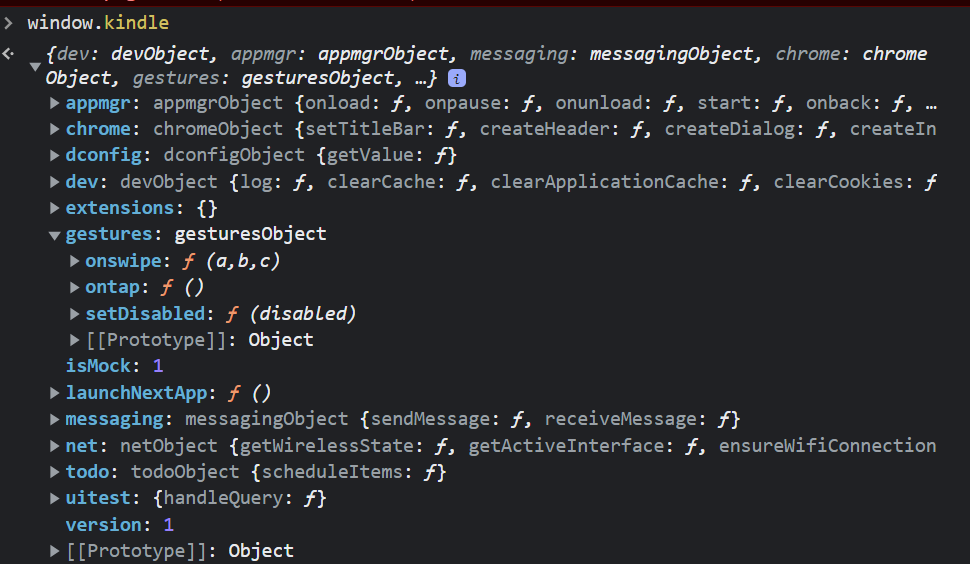
The API is pretty well documented, and it’s most notable feature is that it can read and write to/from certain LIPC properties on the Kindle:
com.lab126.pillowcom.lab126.chromebarcom.lab126.readnow
What particularly interested me here, was com.lab126.pillow as investigating references to it in the firmware revealed a lot of interesting files that pertained to the old UI system (before the React Native migration). It appeared that Pillow itself was used as an interface similar to how Mesquite was used, except for system dialogs with more privileges. Most notably it was used for the Kindle’s settings app which meant it could reset the Kindle among other things.
Now whilst Pillow and stuff that runs under it can do quite a lot, the store/Mesquito can’t as it runs under Mesquite, which doesn’t expose the Pillow API directly, that being said, com.lab126.pillow had an interesting LIPC property called customDialog which allowed for a dialog to be launched given its name on the file system…
Path Traversal
Whilst looking into this LIPC endpoint, I stumbled across a MobileRead thread from 2013
https://www.mobileread.com/forums/showthread.php?t=225632&page=2
Whilst it didn’t seem to work for them, I tried this via Mesquito, and to my surprise - it worked, I was able to get the Kindle to load custom Pillow dialogs.
Why is this significant?
Pillow dialogs expose a significantly privileged API called nativeBridge, compared to WAFs (Web Application Frameworks) run under Mesquite such as the store.
Achieving Code Execution
flowchart TD;
    kppmainapp("KPPMainApp (framework)")
    mesquite("Mesquite (Kindle Store) (framework)")
    pillow("Pillow (root)")
    kppmainapp --> mesquite --> pillow
So far, we’ve managed to communicate with a process running as root, but this doesn’t actually grant us code execution (yet).
To achieve code execution, we’ll need to leverage our new privileged nativeBridge API to send another LIPC command, since Pillow isn’t restricted to what services it can call like Mesquite is, we can call any service which gives us a much larger scope of potential vulnerabilities to exploit…
Telemetry Is Good, Actually???
It turns out, that the Kindle has such a service and property: com.lab126.transfer with the property request_upload, it’s purpose is self-explanatory.
This takes a “HashArray” property (KV object) with the following keys:
{
    "url":
    "source_command":
    "unique_id":

    "netid":
    "priority":
    "notify_progress_interval":
    "notify_pub":
    "notify_prop":
}
During experimentation, Marek discovered the existence of the source_command key, and since com.lab126.transfer is a LIPC service, it runs as root.
The purpose of this key seems to be so that data can be obtained from the output of a shell command and then uploaded to a server.
Putting it all together
sequenceDiagram
    participant kindle
    participant mesquite

    kindle->>mesquite: Load the Kindle Store
    create participant cache
    mesquite->>cache: Check .active_content_sandbox
    cache->>mesquite: Cache found
(returns Mesquito's loader)
    Note left of cache: Now Mesquito is loaded
    Note left of cache: The user loads into WinterBreak

    participant pillow
    mesquite->>pillow: Load dialog
"../../../../../../mnt/us/apps/com.hackerdude.winterbreak/dialoger"
    Note left of pillow: At this point, Pillow now loads our custom dialog
    participant com.lab126.transfer
    pillow->>com.lab126.transfer: Request transfer with "source_command":
"/bin/sh /mnt/us/jb.sh"
    Note left of com.lab126.transfer: jb.sh is now run and the Kindle is jailbroken
A walkthrough
Mesquito
We start with launching Mesquito via the store, the loader primarily just runs the JS to trick the store into thinking it has loaded, and then loads Mesquito itself:
...
    top.location.href = "file:///mnt/us/mesquito/index.html";
...
Mesquito then enumerates apps under the apps/ directory on the Kindle’s userstore (fun fact: it does this by opening an iframe to the apps/ directory, as the Kindle (webkit?) returns a directory listing for whatever reason)
WinterBreak
Once the WinterBreak app is selected, the following LIPC call is made from the Mesquite context:
...
    kindle.messaging.sendMessage("com.lab126.pillow", "customDialog", { name: "../../../../../../mnt/us/apps/com.hackerdude.winterbreak/dialoger", clientParams:{show:true, jsEnabled:false} });
...
This loads the dialoger.html dialog
The WinterBreak Dialog
The dialog is launched via Pillow, which grants it access to the privileged nativeBridge API, from which we can make our com.lab126.transfer request:
nativeBridge.accessHasharrayProperty("com.lab126.transfer", "request_upload", {
        url: "http://127.0.0.1",
        source_command: "sh /mnt/us/jb.sh", // Laughs in freedom
        unique_id: "winterbreak",

        netid: 1, // Force WiFi (idk why sometimes it uses WAN if you don't set this and fails???) (I don't even know if this is the right key I sure HOPE it is)
        priority: 50,
        notify_progress_interval: 20,
        notify_pub: "com.lab126.archive",
        notify_prop: "transferProgressNotification",
    });
And that’s it! The service now runs our jb.sh as root since Kindle services, as mentioned, run as root.
That’s how WinterBreak works, it really is quite simple once you understand it!